
Komodo notifies students when a survey is due, and notifies staff about check-ins, comments and compliments for students in their groups. This guide explains who gets what, and how to change it.
Two levels of settings
Go to Settings → Preferences. The page has two halves:
- Organisation Preferences (admins only) affect the whole school.
- User Preferences only affect the person signed in.
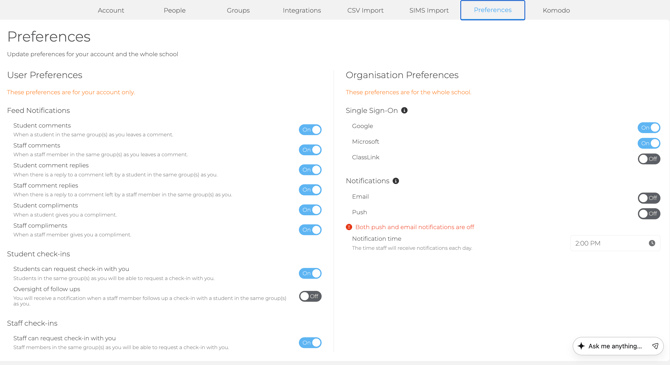
Organisation Preferences (admins)
- Email and Push: turn both on so survey notifications reach students on any device. Push notifications go to students using the Komodo app.
- Notification time: when staff and admins get their daily notifications. This doesn't change when students are notified.
Turning off Email for the whole school also stops staff being told about requested check-ins. Only do this for a short time, and switch it back on.
User Preferences (everyone)
- Feed notifications: emails when students or staff in your groups leave a comment, reply or send you a compliment. Admins over many groups often switch some of these off.
- Students can request check-in with you: admins can turn this off. Staff can't, so an admin changes their groups instead.
- Oversight of follow ups: get notified when a colleague follows up a check-in for a student in your groups.
- Staff can request check-in with you: for schools with Staff Wellbeing.
Change your own User Preferences, not the Organisation Preferences, as those affect everyone.
When students are notified about surveys
- On the day a survey is due, at the Notification time set on that survey.
- An automatic reminder three days later, if they haven't completed it.
- Whenever you click Reminder in Students → Surveys Due. See Viewing outstanding surveys and sending reminders.
Each survey has its own notification time. To change it, open the survey in your calendar and click Edit. See Managing live surveys.
What staff are notified about
For students in their groups:
- requested, recommended and Student Safety check-ins
- feed comments and compliments
- a daily digest of check-ins still waiting, until they're followed up
Troubleshooting
- Emails aren't arriving: check spam, then ask IT to allow emails from no-reply@komodowellbeing.com.
- Notifications arrive at the wrong time: your school's time zone may be wrong. Contact support and we'll correct it.
- I didn't get a notification when my students did: staff and student times are set separately. Ask an admin to check the staff notification time.
- Alerts for students I don't teach: ask an admin to remove you from groups you don't need, rather than switching notifications off.
- A student wants to stop reminders: students can't turn them off. Reminders stop once the survey is completed.
- Pausing reminders for one year group: this isn't possible. Pause that group's survey instead.
Setting up for a new year? This is Step 7 of the Admin checklist. Video: How to customise notification preferences.
