
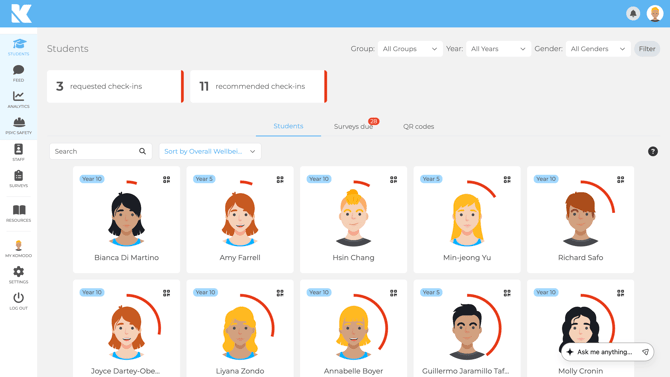
Student Wellbeing is Komodo's core module. Students complete short, regular surveys, and staff get the insight they need to notice who may need support and act early.
Why it exists
Wellbeing concerns are often spotted late, when they are harder to address. Komodo gives every student a safe, simple way to share how they are doing, and gives staff a clear picture across individuals, classes and the whole school.
Komodo is built for students aged 8 to 18. It was developed under the guidance of a New Zealand-registered Child and Family Psychologist and reviewed by professionals in psychology and psychiatry. The question library is evidence-based and peer reviewed. Read more in The Psychology Behind Komodo.
What it is made of
- Surveys: regular pulse, benchmarking and Psychological Safety surveys, built from a psychologist-created question library.
- Wellbeing themes: Achievement and Learning, Digital, Emotional, Physical, Social and Spiritual Wellbeing, School Climate, Sleep, Psychological Safety and Student Safety.
- Check-ins: requested by a student, recommended by Komodo when wellbeing drops, or triggered by a Student Safety answer.
- Student profiles: scores over time, responses, check-ins and private pastoral notes.
- Analytics: cohort, group and theme insights, with exports and Power BI or API connections.
- Student activities: age-appropriate resources, affirmations and gratitude messages to staff.
The value for your school
For students
- A safe, easy way to ask for support.
- A stronger student voice.
- Self-awareness and resilience through regular reflection.
For staff
- Real-time insight across students, classes and cohorts.
- Earlier, targeted conversations and interventions.
- Evidence for inspections and strategic planning, and a way to track impact.
Privacy and access
- Responses are confidential, not anonymous. Only staff with pastoral responsibility see individual data.
- Teachers only see the groups they are assigned to. Students never see their peers' data, and parents do not have access.
- Your school is the Data Controller and owns its data. Komodo is the Data Processor. See the Data Processing Addendum.
Komodo is not a diagnostic or safeguarding tool. It surfaces signals so your staff can act through your own policies.
Getting started
- Set up users and groups via Wonde or CSV. See the Admin checklist.
- Build and schedule your first survey. See the Guide to creating surveys.
- Agree who responds to check-ins and how quickly.
- Review your data together and plan next steps. See Understanding your data.
